Square Speech Bubbles (Thinking / Typing) Free Icons | Vector Assets
Sponsored Link
(PNG)
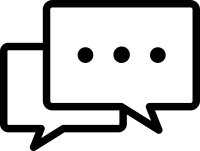
Visualizing the Unspeakable “Pause”, Chat Icon Material
“Square speech bubbles” symbolizing digital messaging overlap, and inside, instead of specific words, a “…” (ellipsis) representing silence or continuation is drawn. This is an icon that intuitively conveys the “typing…” animation displayed while the other party is typing a message in a chat app, or the “thinking” state of being at a loss for words or thinking deeply during a conversation.
Specific Usage Scenes and Suggested Applications
This icon is active in scenes showing the process of communication, from the UI design of web services to chat-style content.
- For “Typing” Displays in Chat and Messaging Apps: Ideal as an indicator displayed while the other party is typing a message (typing indicator). Not only as a still image, but it can also be used as material for CSS animation where the dots blink in order.
- For Expressing “Thinking / Silence” in Dialogue Content: In chat-style novels or dialogue articles, as a presentation expressing a scene where a character is thinking, or a “pause” where silence flows because they are at a loss for words. Rather than writing “(Silence)” in text, it conveys the situation emotionally.
- For “Waiting / Loading” Icons in System Processing: As a loading icon displayed while data is being loaded on a website or during the processing wait time after submitting an inquiry. By using it instead of an hourglass or a spinning arrow, you can give the nuance that “a dialogue (processing) is proceeding in the present progressive tense.”
- For “Generating Answer” in Q&A and Chatbots: On the standby screen while AI is generating an answer to a user’s question. It personifies and expresses the situation of “The AI is thinking hard,” reducing user stress.
- For “Waiting for Reply” Status on SNS and Comment Sections: As a status icon indicating a comment that has not yet received a reply or a case currently being handled. It visually indicates an incomplete state.
Editing Tips and the Merits of the EPS Format
Commercial use is also free. In addition to PNG and SVG convenient for web production, EPS data that does not degrade in DTP or video production is also available for download as a set.
By utilizing the EPS format (vector data), you can freely change the “…” part. Using software like Adobe Illustrator, deleting the dots makes it an “empty speech bubble,” and inserting text like “OK” or “Read” instead makes it a completion status icon.
Also, by coloring the two speech bubbles “gray” and “blue,” you can clearly express the relationship between the sender and the receiver. Please adjust the layout flexibly to match the conversation situation, such as changing the direction of the tails or ungrouping them to line them up side-by-side.
Related Keywords
Speech bubble, Square, Chat, Message, Typing, Ellipsis, Silence, Thinking, Waiting, Loading, Waiting for reply, Icon, Speech bubble, Chat, Typing, Loading, Silence
This Square Speech Bubbles (Thinking / Typing) icon is free to use. Commercial use allowed; no attribution or registration required. Please be sure to check the Terms of Use before using.
Sister Site: Check out our Free Hand-Drawn Illustrations as well.